Conversations
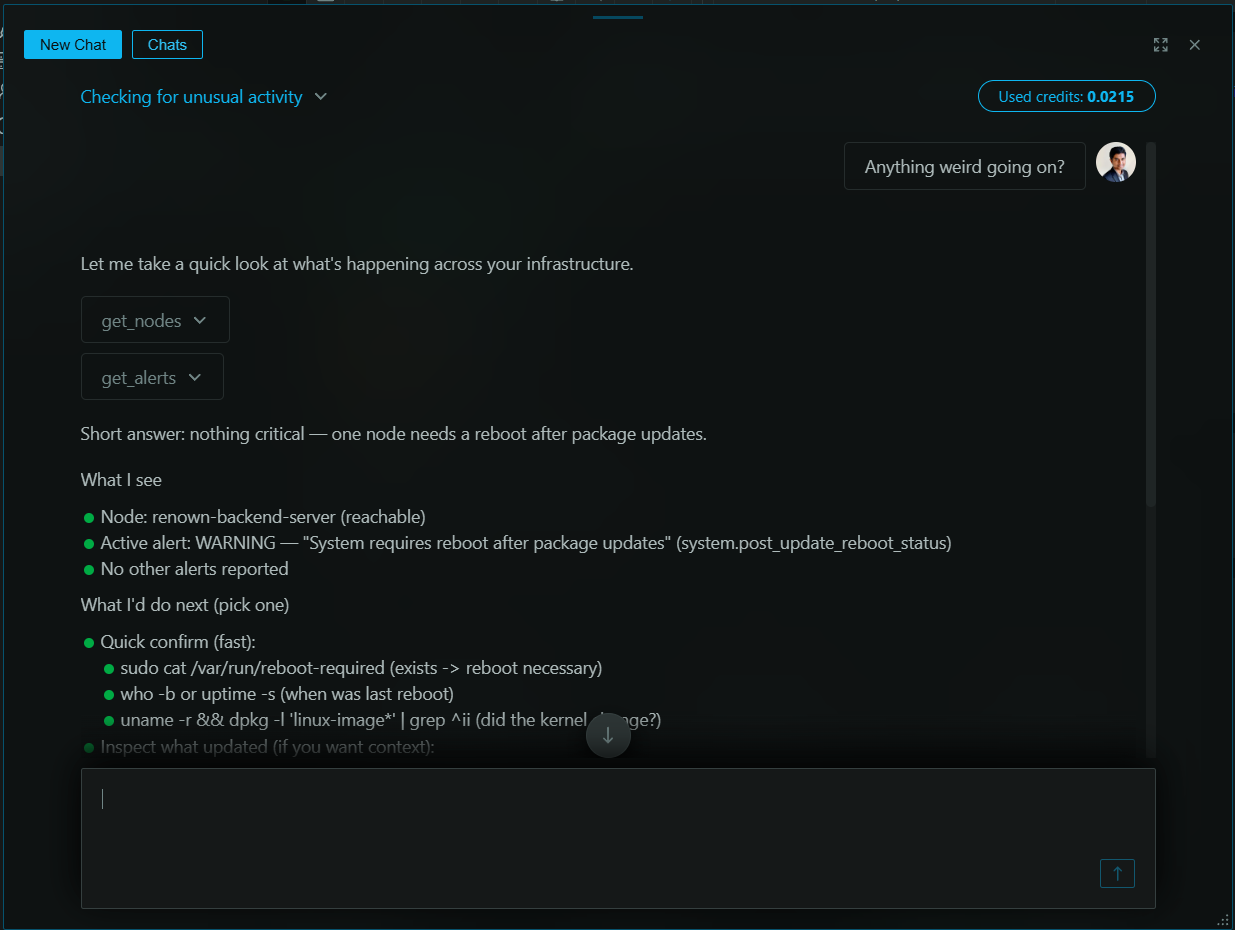
Real-Time Conversations is a live, interactive interface for engaging in a back-and-forth dialogue with Netdata AI. Unlike Investigations and Insights reports that generate comprehensive async documents, Conversations are designed for the rapid-fire "what if" questions and quick exploration that happen in the heat of troubleshooting.
When to use it
- Initial, exploratory phase of an investigation
- Quick questions and ad-hoc data pulls
- Rapidly testing hypotheses during incidents
- Interactive data exploration with instant visualizations
Live Exhibits
Netdata AI doesn't just respond with text—it generates Live Exhibits. These are rich, interactive data visualizations (charts, tables, and log snippets) embedded directly into your conversation.
This eliminates context-switching: you don't need to open new dashboards or manually search for the data the AI references. The evidence appears inline, right in the flow of your conversation.
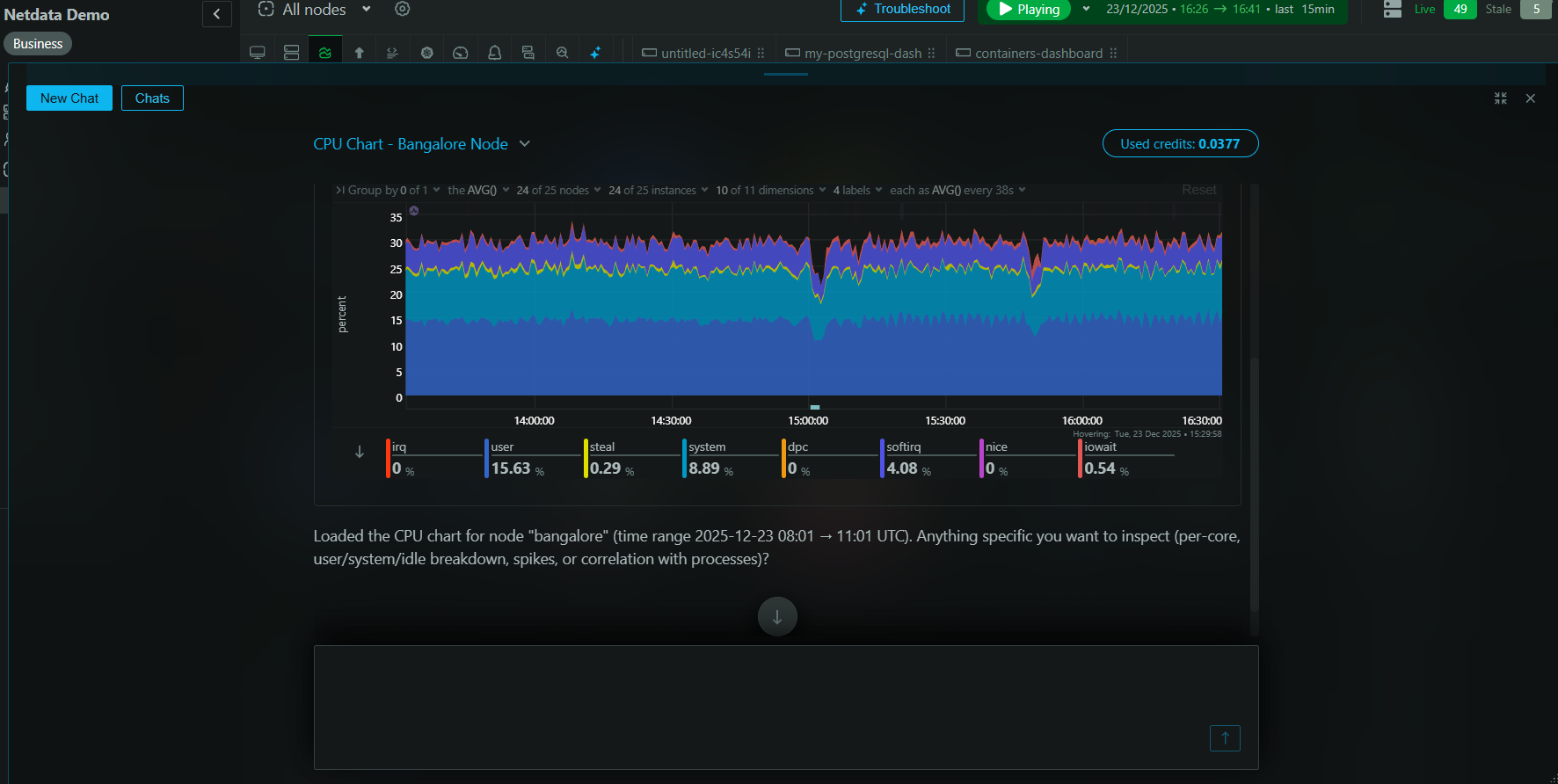
Example workflow
Imagine you're investigating a slow API endpoint:
You: "Show me the average latency for the api-gateway service over the last 3 hours."
Netdata AI: A real-time chart visualizing the P95 latency appears in the chat. You notice a clear spike an hour ago.
You: "What was the CPU usage on the underlying Kubernetes pods during that spike?"
Netdata AI: A table appears listing the pods and their peak CPU usage during the incident window. One pod stands out.
You: "Show me any error logs from that specific pod around that time."
Netdata AI: A snippet of relevant logs appears, showing "database connection timeout" errors.
In under a minute, you've gone from a vague symptom to a clear, evidence-backed root cause—all within a single, continuous conversation.
Conversations vs Investigations
Use the right tool for the right job:
| Feature | Conversations | Investigations & Insights |
|---|---|---|
| Best for | Exploratory, real-time dialogue | Deep, comprehensive analysis |
| Output | Interactive chat with live exhibits | Shareable PDF reports |
| Speed | Instant responses | ~2 minutes to generate |
| Use case | During incidents, testing hypotheses | Post-mortems, capacity planning, stakeholder updates |
Typical workflow: Start with a Conversation to explore and form a hypothesis, then trigger an Investigation to generate a thorough, shareable report.
How to start a conversation
Click the "Conversations" button above the space selectors in Netdata Cloud. Your conversation history is saved, allowing you to pick up an investigation where you left off.
Teaching Netdata AI about your infrastructure
Conversations are also where Netdata AI learns. Tell it what only your team knows — "remember that this alert is expected on the batch nodes", "db-3 is the replica, not the primary" — and it keeps that for every future conversation, investigation, and report in your Space. See Infrastructure Knowledge.
AI credits consumption
Usage is based on AI credits (10 monthly complimentary credits on Business plans, plus the ability to top up as needed).
The conversations window displays a live measure of credits consumed by the current conversation:
- Short conversations use a small fraction of a single credit
- Long, involved conversations may consume more than 1 credit
Availability
Real-Time Conversations are available for all users on a Business plan or free trial.
See also
- Investigations – comprehensive async analysis
- Insights – on-demand professional reports
- Troubleshooting – alert analysis and anomaly exploration
- Infrastructure Knowledge – what Netdata AI knows about your infrastructure, and how to teach it more
Do you have any feedback for this page? If so, you can open a new issue on our netdata/learn repository.